 Vibepanions
Claude Code and Codex usage limits, and every session, at a glance.
Vibepanions is a Claude Code and Codex usage monitor for macOS. It shows what is left of your 5-hour and weekly limits, when each one resets, and which terminal session is waiting on a permission prompt. No typing /usage or /status. It floats above every window, reads only local files, and never asks for your Claude or OpenAI password. macOS 14 and later.
SGD 7.99 once, updates included. Not for you? Full refund within 14 days. macOS 14 or later. See the terms and the privacy policy.


How much Claude Code and Codex usage do I have left?
Vibepanions shows the share of your 5-hour and weekly limits you have used, and when each one resets, for Claude Code and Codex, without you typing a command. One plain line tells you how much of the tighter limit is left.
Both tools meter you twice. A rolling 5-hour limit caps a burst of work, and a weekly limit caps the total. Hit either one and your agent stops until it resets. In the terminal you can check with /usage in Claude Code (/cost and /stats open the same screen) or /status in Codex, but only when you think to type them, and only in the session you are in.
Claude Code hands your plan's own limits to its status line, and Vibepanions shows those figures. Until Claude Code has reported, it estimates from your own past windows and labels them estimated.
The ring on the widget shows how much of your 5-hour limit you have used, for Claude or Codex. It is the one number you see without opening anything.
How it compares with other Claude Code usage monitors
| Tool | What it is | Codex | Shows which session waits |
|---|---|---|---|
| Vibepanions | Floating macOS widget and office view | Yes | Yes |
Built-in /usage and /status | Commands inside Claude Code and Codex, free | Yes, /status | No |
| Claude Code Usage Monitor | Live terminal monitor, Python | Not stated | Not stated |
| ccusage | Command line reports from local usage data | Yes | Not stated |
| CodexBar | macOS menu bar app for many providers | Yes | Not stated |
From each tool's own README, 23 Sep 2026. "Not stated" means its README does not say.
Which one suits you? If you check now and then, the built-in commands are enough. If you live in one terminal, a terminal monitor like Claude Code Usage Monitor keeps a dashboard beside you, and ccusage is good for looking back at cost. If you run several Claude Code or Codex sessions at once on a Mac and want your limits and the waiting session in view all the time, that is what Vibepanions is for.

Which session needs me right now?
The one the widget is waving about. When a session stops for a permission prompt or a question, the companion turns to face you and an amber badge counts the sessions waiting. That is the real widget, down in the corner. Drag it anywhere, click it for a glance. On your Mac it floats above every window and every Space, and tells you what your terminals are doing.
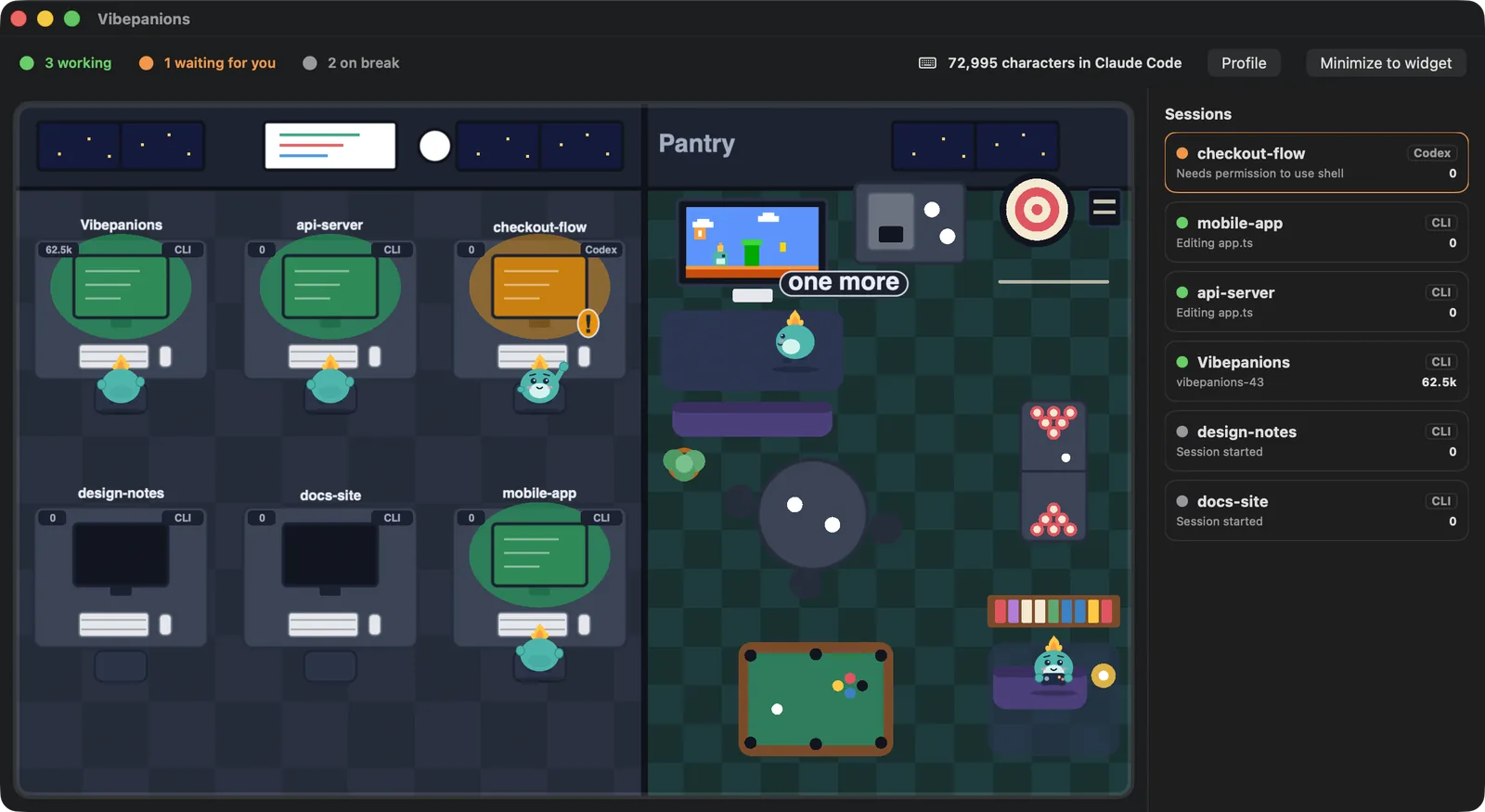
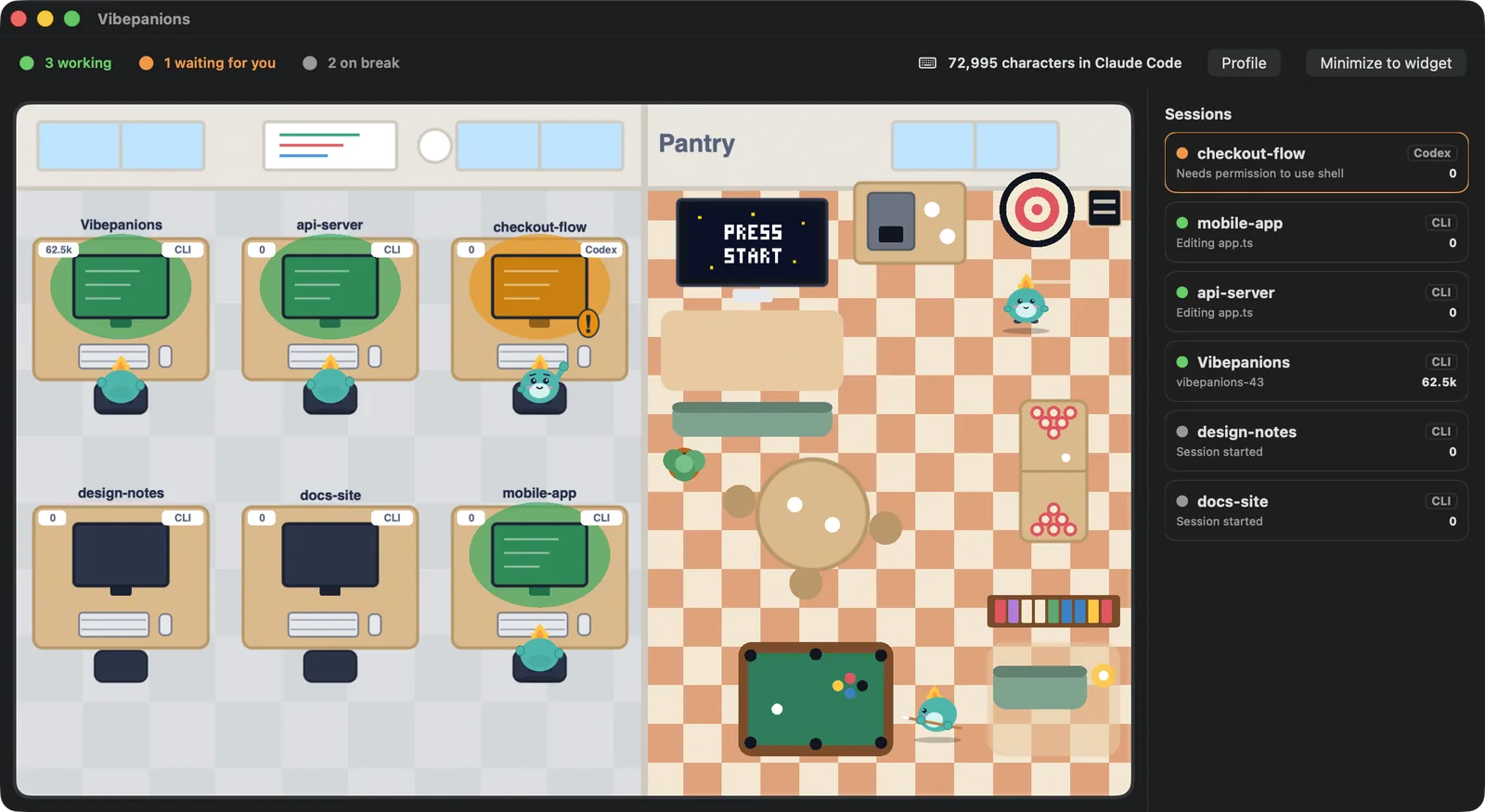
Open the office and every project gets a desk: green while it works, amber while it waits for you, and idle agents wander off to the pantry for darts, pool or a quiet read. Click a desk and that exact terminal tab comes to the front. No more cycling through terminals to find the one that stopped to ask you something.


Why keep it open?
Because it is fun to have around. Every character you type to your agent, and every character it writes into your files, counts toward a lifetime total. Fifteen companions unlock along the way, and you can follow friends by GitHub username to see theirs at work. Try it: type anything.
Next: Miso at 200k
Sped up for this page. In the app, Miso arrives at 200,000 characters, about a day of heavy use.
Questions
What is Vibepanions?
Vibepanions is a Claude Code and Codex usage monitor for macOS. It shows what is left of your 5-hour and weekly limits, when each one resets, and which terminal session is waiting on a permission prompt. It floats above every window as a small animated companion, and opens into an office with one desk per session.
Is Vibepanions a Claude Code usage monitor?
Yes. It is a usage monitor for Claude Code and Codex on macOS. It keeps your 5-hour and weekly limits, their reset times and the state of every session on screen, instead of a terminal dashboard you have to keep open.
Does it work with Codex as well as Claude Code?
Yes. It reads Claude Code and Codex sessions side by side, and the office has a switch to show either platform's limits. Codex writes its limit figures into its own session files, so those are reported, not estimated.
How does it know my Claude limits?
Claude Code hands your plan's 5-hour and weekly usage to its status line. Vibepanions installs a small pass-through in front of your own status line that keeps a copy and then runs your status line unchanged. Until Claude Code has reported, it shows an estimate from your own past windows, labelled estimated.
Which macOS versions are supported?
macOS 14 and later.
Does it work on Windows or Linux?
No. Vibepanions is a native macOS app and needs macOS 14 or later. There is no Windows or Linux version.
Does it send my code or prompts anywhere?
No. By default nothing about you leaves your Mac. If you choose to sign in with GitHub to keep your score online, your GitHub login, avatar, character totals, a character id and a coarse state are stored. Never prompts or code.
Can Vibepanions see my screen?
No. It never records or captures your screen. It reads the files Claude Code and Codex write in your home folder. The optional Cowork watching, which you switch on yourself, asks for macOS Accessibility permission to read the Claude app's task labels.
What are the companions?
Fifteen characters that unlock as you and your agents type, starting with Miso at 200,000 characters. They are there for fun; the limits and sessions are the point.
How is this different from /usage in Claude Code?
/usage in Claude Code and /status in Codex answer only when you type them, in one terminal. Vibepanions keeps your limits on screen all the time, for Claude Code and Codex together, and shows which session is waiting for you.
How is Claude Code usage measured?
Against two limits at once: a rolling 5-hour session limit and a weekly limit. The allowance is shared by claude.ai, Claude Code and Claude Desktop, and message length, attached files, tools, the model and the effort level all affect how fast you use it.
How do I check how much usage is left in Claude Code?
Type /usage in Claude Code (/cost and /stats open the same screen), or open Settings > Usage on claude.ai. In Codex, type /status. Vibepanions shows the same limits all the time, without typing anything.
What should I do when I hit a limit?
Wait for the reset, or pay for more. On Claude you can upgrade your plan or buy usage credits (Pro, Max 5x and Max 20x), and switching to a lighter model with /model makes the rest of a window last longer. On Codex the usage page offers credits, an available reset, an upgrade, or waiting. Vibepanions keeps the share that is left on screen, so you see it coming.
Did Claude Code and Codex limits change in 2026?
Yes, several times. On 6 May 2026 Anthropic doubled Claude Code's 5-hour limits for Pro, Max, Team and seat-based Enterprise and removed the peak hours reduction for Pro and Max. On 25 August 2026 OpenAI brought back the 5-hour limit for Plus accounts in Codex. Limits move often, so your own usage page is the current answer.
What does it cost?
It costs SGD 7.99, paid once. There is no subscription and nothing renews, and updates for this version are included. If it is not for you, write to us within 14 days for a full refund.
Is it made by Anthropic or OpenAI?
No. Vibepanions is an independent app built by DevSparks. It is not affiliated with Anthropic or OpenAI.
Get Vibepanions
SGD 7.99, paid once, for macOS 14 or later, for Claude Code and Codex. Nothing renews. Not for you? Write within 14 days for a full refund.